• Tutorial Website

  • Recent Comments

  • Browse by Tags

Cara Memasang Musik Pada Blog

This item was filled under

N
geblog sambil dengerin musik memang mengasikkan. Oleh karena itu, musik bisa juga dijadikan alat untuk menarik minat pengunjung berlama-lama nongkrong diblog kita. Kali ini saya akan memberikan tutorial website mengenai cara memasang musik pada blog kita. Sehingga blog kita terlihat lebih mewah dan lebih keren. Caranya? Ikuti saja langkah berikut:
  1. Buka situs http://www.musik-live.net. Tujuannya adalah untuk mendapatkan kode musik yang akan kita pasang pada blog. Disana tersedia banyak lagu yang bisa Anda pilih. Klik salah satu daftar lagu.
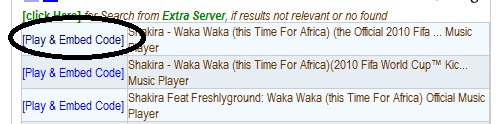
  2. Kemudian akan muncul halaman yang berisi beberapa link kode yang bertuliskan "Play & Embed Code". Anda bisa memilih salah satunya.
  3. Kemudian Anda akan masuk ke halaman kode lagu yang telah terpilih. Di sebelah kiri halaman Anda bisa mendengar lagu yang Anda pilih melalui music player pada situs tersebut. Sedangkan dibagian tengah, Anda akan melihat kolom "Embed code" yang berisi kode dari lagu yang kita pilih. Kode tersebutlah yang akan kita masukkan ke dalam blog kita. Untuk mengkopi kode, silahkan klik tombol "copy" yang ada di sebelah kanan kolom tersebut.
  4. Sekarang login ke blog Anda di blogspot. Pada bagian dasbor, klik link menu "Rancangan". Kemudian, klik link "Tambah Gadget" pada bagian dimana Anda ingin menempatkan musik tersebut pada blog Anda.
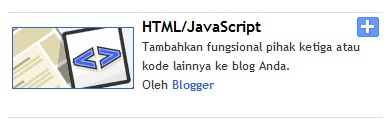
  5. Akan muncul window "Tambahkan Gadget". Silahkan Anda cari dan pilih gadget "HTML/Javascript".
  6. Copy paste kode yang Anda dapat pada langkah 3 ke dalam kolom kode gadget "HTML/Javascript" tersebut. Setelah itu klik "Simpan".
Selamat mencoba.

Continue reading...

Get The Best Webhosting Provider For Your Site

This item was filled under ,

W
hen we want to have a hosting provider, there are many important things for our consideration. This often makes the website owner became dizzy. However, with the help of webhostingrating, we can get guide in choosing the best web hosting server. Webhostingrating is a site that provides information about web hosting providers that provide hosting and domain. It makes a lot of reviews and ratings for webhosting. I'm sure you can get a review and rating of web hosting that match your needs.


Webhostingrating making a review of the famous web hosting providers in the world. It makes a complete review, such as the price for each package hosting disk space, bandwidth, applications that are available in that web hosting, and the other services provided by the web hosting provider.

In fact, webhostingrating giving rate to the webhosting provider that is reviewed by him based on several criteria. This is very helpful to the user to view the best web hosting. Another very good service provided by webhostingchoice is Hosting Guide. Through these services, we can gain a good knowledge or information about webhosting. Hosting Guide is very useful for you who may not understand about hosting and domains. I think by reading this information you will know a lot about hosting in particular about the things required for a good hosting. Furthermore, you can compare web hosting providers are reviewed by webhostingrating.

Continue reading...

Get The Right Webhostings Review In The World

This item was filled under ,

L
ooking for web hosting providers in accordance with the needs of our website basically does not require much time. Especially if done in a way unusual. If using the usual way, the possibility of getting the best web hosting provider is very small. Extraordinary way is utilizing the information provided by webhostinggeeks. Why choose it? I can confirm that there are so many web hosting providers that have been evaluated and reviewed by it. In addition, webhostinggeeks also makes rating and give awards for the webhosting that have been evaluated. The information provided is certainly able to help you choose web hosting that really deserve for your use.

I think the information on web hosting providers who have provided information webhostinggeeks is expensive. One of the advantages of webhostinggeeks is that there is a review about dedicated hosting. Such information is useful for you who seek web hosting service that provides a non-shared server. That means, only you will be using a server that is provided to store your website. webhosting will not share it with other customers. Therefore, you will get the space, bandwidth, and other quality features.

Remarkably, the rating given by webhostinggeeks very updated. There are many type of web hosting providers reviewed by it. If you want to know the information review and rating of web hosting that provides attractive features, such as a review of webhosting that provides free domain, I think webhostinggeeks is the right source.

Continue reading...

Build Communication With Your Customers Using Live Chat!

This item was filled under

I
hate the businessmen who were not serious. Especially if they never build good communication with consumers. Supposedly, the communication with consumers should continue to be done. This condition can be beneficial to both parties. In fact, I think, it would be more profitable the business. If customers can easily communicate with businessmen, they'll feel safe buying products or services from such businesses. If security is there, consumers will be satisfied. Sense of satisfaction is directly proportional to loyalty. You know the meaning of loyalty? This means that consumers will continue to use the products or services from the businessman, or they will invite others to use it too, or they will promote the products the business even though they were not paid. I can feel it when I became a consumer.


Many ways can be done to establish communication with the consumers. One that I think effective is a live chat. I found it on a hosting company that I use and I recommend to my colleagues many times. With a live chat, I can easily and quickly asked a lot of things I need to them. Remarkably, the response from them is very fast compared to send me an email. The effect, I feel comfortable when using their product. I am not shy to promote his company to my colleagues or clients. Other tangible evidence that I have found, they released more than 690 names of customers for a short period (including one of my clients). For me it was fantastic for this type of company. They get a fair amount of customers that much.

With the live support via live chat, the potential customer more quickly understand the product being offered so that they not only arrived but left immediately without buying anything. However, promotion is still very effective immediately, and a live chat software can help to do it.

Continue reading...

Membuat Album Foto pada Wordpress CMS dengan Plugin NextGEN Gallery

This item was filled under

W
ordpress CMS memang bukan blog biasa. Menurut saya dia sudah mulai bisa mengejar kompleksitas website dinamis yang standart (website yang bukan hanya sekedar sebuah blog). Bahkan, tidak terlalu kalah jauh dengan CMS lain yang saat ini sangat terkenal (Joomla, Drupal, dll). Sistem yang ada pada Wordpress CMS bukan hanya sekedar untuk menulis posting, tapi lebih dari itu.

Keunggulan yang tidak dimiliki oleh Blogspot tersebut dikarenakan developing (pengembangan) plugin yang juga sangat maju pada Wordpress. Beberapa tutorial penggunaan plugin Wordpress CMS yang telah saya berikan juga telah menunjukkan hal tersebut. Nah, kali ini ada 2 plugin lagi yang bisa kita gunakan untuk menambahkan fitur-fitur yang juga umum dipakai pada website lainnya, yaitu Album Foto dan Forum. Pada bagian ini akan saya mulai dengan pembuatan Album Foto. Plugin Wordpress yang akan kita gunakan adalah NextGEN Gallery. Langkah-langkahnya adalah :
  1. Download Plugin NextGEN Gallery terlebih dahulu.
  2. Instal plugin tersebut pada Wordpress Anda. Anda bisa melihat cara instalasi plugin Wordpress di sini.
  3. Jika plugin sudah di aktivasi, maka pada dashboard akan terlihat menu tambahan bernama Gallery.
  4. Taksonomi foto pada Wordpress menggunakan plugin ini terdiri atas 3 bagian seperti digambarkan di bawah ini:
  5. Sebelum menambahkan foto ke dalam website, kita perlu membuat nama “gallery” dari foto yang akan kita masukkan. Untuk itu,klik link "Add Gallery/Images" pada bagian "Gallery". Tuliskan nama gallery baru dari foto yang akan kita masukkan pada kotak isian “New Gallery”.
  6. Ada tiga (3) cara untuk memasukkan foto.
    • Upload a Zip-File, yaitu memasukkan foto dengan jumlah yang banyak sekaligus namun harus dikelompokkan dan dikompres ke dalam sebuah file .zip. Klik tab “Upload a Zip-File” pada halaman penambahan gallery (Langkah 5). Dibagian “Select Zip-File”, klik tombol Browse untuk memilih foto-foto yang telah dikelompokkan dan dikompres ke dalam .zip tersebut dari komputer. Kemudian dibagian “in to”, pilih Gellery dimana foto-foto tersebut akan tersimpan. Setelah itu klik tombol Start Upload.
    • Import image folder, yaitu mengimport foto yang telah ada di dalam hosting website kita. Klik tab “Import image folder”, kemudian tuliskan path folder foto (tempat dimana folder foto berada) yang akan diimport sebagai foto.
    • Upload Image, yaitu mengupload foto satu per satu (secara tunggal) ke dalam gallery foto yang kita tentukan. Klik tab “Upload Images”, kemudian klik tombol Browse untuk memilih foto yang akan diupload dari komputer. Dibagian “In to”, pilih gallery dimana foto tersebut akan diupload.
  7. Kita bisa melihat dan mengatur gallery yang telah ada melalui menu “Manage Gallery” yang ada di bagian “Gallery”.
  8. Kita juga bisa membuat album dari foto-foto yang telah kita masukkan. Sesuai dengan taksonomi yang ada pada Langkah 4 di atas, kita bisa mengelompokkan beberapa gallery foto ke dalam sebuah album. Tujuannya sebenarnya untuk mempermudah pengelolaan dan memudahkan menampilkannya pada halaman website. Silahkan klik menu “Album” pada bagian “Gallery”.
  9. Selanjutnya, kita buat sebuah Album baru, misalnya saya beri nama “April 2010”. Maka pada bagian “Add new album”, tuliskan “April 2010”, kemudian klik tombol “Add” yang ada disampingnya (seperti yang dilingkari hitam).
  10. Langkah selanjutnya adalah mengelompokkan gallery foto ke dalam Album April 2010 tersebut. Pastikan pada bagian Select Album, yang terpilih adalah “April 2010”. Kemudian, pindahkan beberapa gallery yang ingin dikelompokkan ke dalam album tersebut dengan cara mengdrag satu persatu dari kolom “Select Gellery” ke kolom Album April 2010. Setelah itu klik tombol “Update”.
  11. Untuk menampilkan foto-foto tersebut ke dalam front site, kita bisa melakukannya dengan menampilkan pada page baru. Buatlah sebuah page dengan mengklik menu “Add New” pada bagian “Pages”. Beri nama “Album Foto”.
  12. Pastikan pilih tab “Visual”. Pada tools box kotak pengisian page tersebut, terdapat tombol “Add NextGEN Gallery” yang dilingkari merah pada di bawah.
    Klik tombol tersebut, maka akan muncul popup window untuk memilih Album, Gallery, atau Foto yang akan kita tampilkan. Sebagai contoh, kita akan menampilkan foto-foto yang telah dikelompokkan ke dalam Album April 2010 tadi. Untuk itu, pilih tab “Album”, kemudian pilih Album April 2010. Setelah itu, klik tombol Insert.
  13. Maka pada kotak isian page tersebut akan muncul sebuah tag yang berfungsi untuk menampilkan Album April 2010.
  14. Id=3” menunjukkan Album yang ditampilkan adalah album dengan ID = 3, yang dalam hal ini adalah Album April 2010. Sedankan “template=compact” berarti Album akan ditampilkan dalam bentuk “compact”. Untuk melihat perbedaannya, silahkan coba menampilkan album dengan mode template yang berbeda, baik Compact maupun Extended. Hasilnya akan terlihat seperti Gambar berikut:

Continue reading...

Thinking More About My Web Hosting Provider

This item was filled under ,

I
have to start thinking about a new web hosting for my blog. My web hosting service is ending soon. In fact, my domain already approaching the period expired. There is one thing which I think is very important to be repaired. That is the loading of my blogs. Actually, my files size blog had been optimized. But almost everyone says that if my blog very difficult to open. Apparently, the problem arises from web hosting server. Web hosting that I use is the cheapest when compared with the average price of web hosting from the other. But one thing that i gave up, quality hosting. Website which be hosted on that server is very slow if accessed.
For the second year, I do not want to experience the same error. Olden, I just needed to create personal blogs and to build network. But now I want to create a business blog and hosted it at the same provider. Luckily, I found webhostingfun.com. From this site, I can get updated informations about best web hosting that I can choose. Also complete with a review of each web hosting. Can I get a lot of new information from this site. One of the most important is the knowledge sharing that exist in that website. Through this website i can get new knowledge relating to the Content Management System that I developed today often like Wordpress and Joomla. Funny thing is, the end of this month I will conduct training development of the e-commerce with Joomla on my campus. Luckily, from webhostingfun.com, I get a lot of information about web hosting and interesting tips about e-commerce that I can share to the trainees.

If the science of management, choosing a web hosting is a process of multi criteria decision making (MCDM). Many of the criteria that should we measure and consider. Characteristics of this problem is “trade off”. It means taking satisfaction from one option, it will reduce the satisfaction from other options. However, we deserve webhostingfun.com thanked because they have measured the criteria of these web hosting providers and made web hosting reviews. We only need to choose the best for us.

Continue reading...

Telemarketing Your Marketing Solution Today

This item was filled under

T
o survive in business world today, you have to make sure that your marketing strategy is unique enough. The fact is there are a lot of well established businesses that you should accept their bankrupt just because they don’t have a unique marketing strategy that is not only applicable to the situation today but also suits best to their business needs.

Internet marketing is one of the solutions that are highly recommended today. The flexibility and the efficiency of internet technology are providing people one amazing and fast media to transfer information. However, internet marketing itself is so various and telemarketing lists is one that is recommended. If you are not really familiar with this system, perhaps as the start you can visit The List Company for the further information. This company is dedicated themselves to maximize your telemarketing solution by providing you the data that you need that they have been collecting by their direct marketing specialist.

If your business is working on financial field, perhaps you can utilize their mortgage mailing list or business insurance list. To help you ensuring yourself more toward the telemarketing list solution, why don’t you give their site, Tlclists.com a visit, for the further and detail information.

Continue reading...